An agent that can write you a function isn’t necessarily one that can ship a feature. One that can ship a feature isn’t necessarily one that can reliably deliver an entire system.
The previous article covered Harness best practices for single-agent scenarios — how to write AGENTS.md, how to save tokens, how to design a memory system.
But when your real task looks like this:
- A new feature touches frontend pages, backend APIs, database migrations, and deployment config
- Each area has its own conventions and constraints
- The output of each step feeds into the next
- A single step failing can waste all previous work
One agent isn’t enough. You need a team of agents working together.
The question is: when you go from 1 agent to N agents, how must your Harness change?
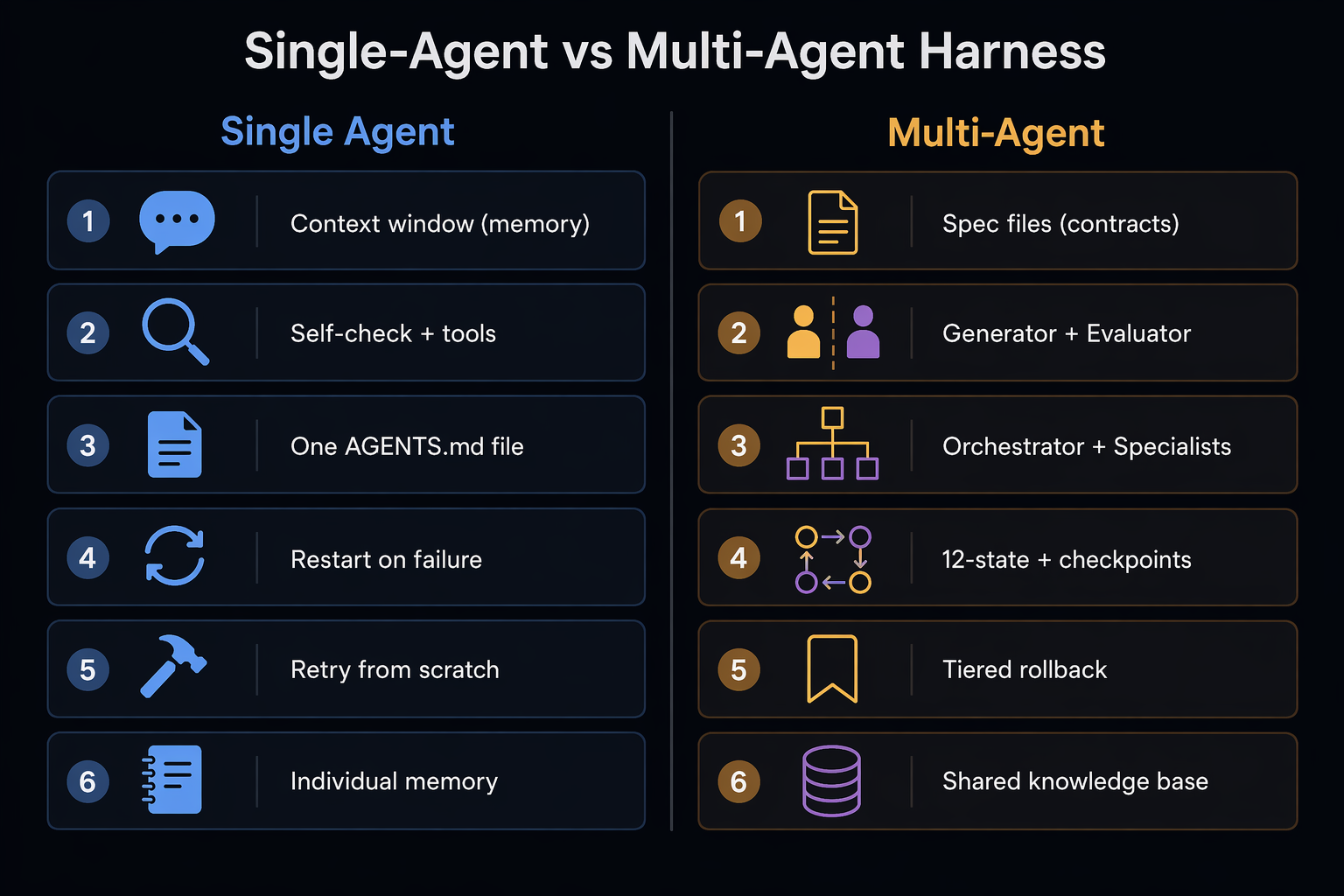
This article compares 6 dimensions — communication, verification, identity, state management, error recovery, and evolution — telling you how each works for a single agent and why multi-agent demands a different approach.
Why You Can’t Just Have One Agent Do Everything
Let’s start with the conclusion: it’s not that the model isn’t smart enough — it’s that the context can’t hold everything, and constraints can’t be enforced.
The fundamental limitation of a single agent is that the context window is a shared resource. One agent has to simultaneously hold requirements, architecture specs, historical lessons, current task state, and tool definitions — before it even starts working, context is already half-consumed by infrastructure.
Even more dangerous is constraint drift. You tell the agent at the start: “all timestamps must be stored in UTC” or “API routes must follow the /m/, /s/ convention.” By turn 30, it might have used local time in a new file or invented a /manage/ route. The agent isn’t being lazy — the longer the context window, the more early information gets diluted. Your rules aren’t overwritten; they’re just weighted less.
Multi-agent isn’t for showing off — it’s for splitting one context that can’t hold everything into multiple contexts that can. Each agent focuses on one domain with fewer but more rigid constraints.
Dimension 1: Communication — From Conversations to Files
How Single Agents Do It
All information flows through the context window — prompts + memory + tool results. Your conversation history with the agent is the entire context.
Advantage: Simple and direct, lossless information. Disadvantage: Context gets increasingly bloated. As information accumulates, critical constraints get buried.
How Multi-Agent Does It
Agents communicate via file-based message passing, not conversation history.
Specifically: the Orchestrator agent writes task instructions, requirement clarifications, and state tracking to files, then passes them to downstream specialist agents. Each agent reads and writes files independently. Downstream agents read files when needed — they don’t need the full conversation history of upstream agents.
Orchestrator Agent
  │
  ├─writes→ task_instruction.md
  ├─writes→ requirement_clarification.md
  ├─writes→ state_trace.md
  │
  ▼
Specialist Agent A (Requirement Analysis)
  │ reads upstream files → works → writes output files
  ▼
Specialist Agent B (Solution Design)
  │ reads upstream files → works → writes output files
  ▼
Specialist Agent C (SQL Development)
  │ reads upstream files → works → writes output files
  ▼
Specialist Agent D (Test Validation)
Why is this necessary?
- Traceable: Every agent’s input and output is recorded in files; problems can be traced back
- Auditable: Who decided what, when, based on what information — the file chain is clear
- Recoverable: Terminate the process at any point; resume from files next time
- Decoupled: Each agent only reads relevant files, doesn’t load irrelevant context
- Isolated: One agent’s errors don’t pollute other agents’ contexts
Core shift: In single-agent, context is “memory.” In multi-agent, context is “contract.” Memory blurs; contracts don’t.
Dimension 2: Verification — From Self-Check to Separation
How Single Agents Do It
The same agent checks its own work after writing code. The five-layer self-repair Harness from the previous article — Hooks, CI, tests, lint — all belong here: external deterministic tools verifying outside the agent loop.
Advantage: Mature toolchain (PostToolUse hook, Stop hook, CI pipeline). Disadvantage: Agents have a cognitive blind spot — they almost always think their own output is “pretty good.”
How Multi-Agent Does It
The entity that writes code and the entity that judges whether it’s good enough must be two different roles.
Generator                   Evaluator
┌──────────────┐           ┌──────────────┐
│ Specialist    │  ──output─▶ │ Review       │
│ Agent         │           │ Agent        │
│ Writes code/  │           │ Checks with  │
│ plans         │           │ independent  │
│               │           │ standards    │
└──────────────┘           └──────────────┘
Why must they be separated?
The root cause is in how LLMs work: generating text and evaluating text use the same model parameters, so an agent is inherently biased toward finding its own output reasonable — it can’t “step outside” itself. It’s like asking a student to grade their own exam: a near-perfect score is almost guaranteed.
After separation, the evaluator checks with independent, pre-set standards — unaffected by the generator’s reasoning process. This is far more reliable than “letting the agent reflect on itself.”
Reliability is worth more than peak capability. An 80-score agent with predictable behavior is better for production than a 95-score agent that occasionally goes off the rails — because you can actually trust it with permissions.
What Single-Agent Users Can Learn
Even with one agent, you can use a Stop hook for completion verification — letting an independent process (not the agent itself) check whether output meets pre-set conditions. This is essentially a simplified Generator-Evaluator separation.
Dimension 3: Identity — From One File to One Team
How Single Agents Do It
One AGENTS.md defines all behavior — rules, constraints, knowledge, processes. As covered in the previous article, this file should be kept under 60 lines; too many rules and the agent will “selectively comply.”
How Multi-Agent Does It
Identity design becomes organizational design.
First, the architecture pattern is Orchestrator + Specialist:
- Orchestrator Agent: Never writes code itself. Does only three things: decides who should do the work, checks if it’s done well, and figures out what to do when something goes wrong.
- Multiple Specialist Agents: Each has clear boundaries (frontend / backend / database / testing)
The Orchestrator carries 6 explicitly defined role identities:
| Role | What It Does |
|---|---|
| Dispatch | Picks the right specialist based on task type |
| Confirm | Asks follow-up questions when info is missing |
| Review | Checks specialist output against independent standards |
| Gate | Hard checks must pass before proceeding |
| Report | Keeps the user informed of progress and results |
| Fallback | Decides whether to retry, rollback, or abort |
Second, each agent’s rule system uses a three-tier pyramid:
| Tier | Content | Signal Strength |
|---|---|---|
| Top: Super Red Lines | Violations cause serious incidents; very few | Strongest, agent must absolutely obey |
| Middle: Error Records | Historical lessons learned | Medium, fuel for system evolution |
| Bottom: Operating Rules | Knowledge retrieval processes, output templates, error handling standards | Weakest, too many leads to selective compliance |
Why tier it?
A rule’s effectiveness is inversely proportional to how many there are. When every rule is written with equal severity, the agent either ignores them all or becomes paralyzed — it can’t tell what’s a real hard stop and what’s just a suggestion.
Tiering is essentially labeling priorities. Red lines are “stop on violation” hard constraints. Operating rules are “try to follow” soft suggestions. Clear priorities let the agent know when to be flexible and when to brake.
What Single-Agent Users Can Learn
Your AGENTS.md should also be tiered:
- Hard constraints (things CI enforces) → at the top, with the sternest wording
- Soft constraints (style, conventions) → in the middle, with suggestive language
- Knowledge (how to use a tool) → at the bottom, loaded on demand
Dimension 4: State Management — From Stateless to State Machine
How Single Agents Do It
Session ends, start over. The CLAUDE.md + MEMORY.md from the previous article are the closest thing to “state,” but they’re passive — the agent doesn’t actively track “which step of the process am I on right now.”
How Multi-Agent Does It
Define 12 explicit state enumerations, from “requirement received” to “completed,” covering every node in the full workflow:
Requirement Received → Requirement Clarification → Requirement Confirmed →
Solution Design → Solution Review → Solution Confirmed →
Development → Development Complete → Testing → Test Passed →
Deployment Check → Completed
Each task maintains a state tracking file. Terminate the process at any point; resume next time by reading this file — back to the checkpoint in seconds, without re-running any completed steps.
At the end of each stage, a forced compression into a fixed-format Checkpoint is appended to the state file:
Stage: API Design Complete
Key information for the frontend development agent:
  - Endpoint: POST /api/articles
  - Auth: Requires cookie token
  - Timestamps: UTC (ISO 8601 format)
Items to watch: Image upload endpoint not ready yet
Why is this Checkpoint format so important?
It’s not a summary for humans — it’s a contract for the next agent. When the next agent starts and reads this file, it knows: what decisions were made upstream, what information was passed, what needs attention — without reading the full conversation history.
What Single-Agent Users Can Learn
In Claude Code, you can use an exec-plans/ directory + checkpoint files to do something similar:
- Before starting a complex task, write an execution plan file
- After completing each step, update the status in the file
- If a session breaks, have the agent read this file first next time
This is far more reliable than depending on the agent’s “memory.”
Dimension 5: Error Recovery — From Retry to Tiered Rollback
How Single Agents Do It
Made a mistake? Fix it and try again. The previous article covered three failure categories: recurring mistakes → write to CLAUDE.md; machine-judgeable errors → write as hook/lint/test; unstable processes → write as Skill/workflow.
How Multi-Agent Does It
Three-tier fault grading, each with clear handling:
| Level | Scenario | Handling |
|---|---|---|
| Retryable | Knowledge base lookup failed, API timeout | Auto-retry 1-2 times, self-heal |
| Needs Rollback | Solution design rejected, code test failed | Roll back to last stable checkpoint, re-invoke |
| Must Abort | Fundamental requirement misunderstanding, dependency install failed | Stop, honestly tell the user |
The key is tier 2: rollback to stable checkpoint.
When a single agent fails, the worst case is starting over. But in a multi-agent system, earlier steps might represent hours of work (requirement clarification, solution design, multiple agents collaborating). If step 4 testing fails, you can’t let steps 1-3 go to waste.
With state machine + checkpoint, you can:
- Detect test failure
- Find the last passing checkpoint (e.g., “Solution Confirmed” state)
- Roll back to that state, re-execute “Development”
- Leave “Requirement Clarification” and “Solution Design” outputs untouched
This is the power of state machine + file-driven design — errors can be isolated locally, no global rollback needed.
What Single-Agent Users Can Learn
In Claude Code, you can achieve similar results through git commit + exec-plans:
- Commit after completing each step (create a checkpoint)
- On error,
git checkoutto the last commit, instead of starting over - exec-plans file tracks current progress
Dimension 6: Evolution — From Individual Memory to Organizational Learning
How Single Agents Do It
Make a mistake → write it into CLAUDE.md. As the previous article covered, every line in AGENTS.md corresponds to a mistake the agent once made. But this is individual memory — only this project’s agent knows it.
How Multi-Agent Does It
Mistakes become a three-tier organizational learning system:
- Real-time recording: The moment a user says “you did this wrong,” it’s recorded to the knowledge base
- Automatic loading: All agents load the historical lessons file at startup
- Behavioral constraint iteration: Repeatedly occurring errors auto-promote to super red lines
The difference: single-agent experience lives in one CLAUDE.md, while multi-agent experience enters a shared knowledge base that all agents benefit from.
Every pitfall must become part of the system — a CI check, a lint rule, a hook script. As long as it lives only in a prompt or memory, it will happen again.
What Single-Agent Users Can Learn
If you have multiple projects, maintain a global ~/.claude/CLAUDE.md (user-level memory) for cross-project universal lessons. Each project’s ./CLAUDE.md only holds project-specific rules. This is the six-level memory architecture from the previous article — global rules, project rules, personal rules each serving their purpose.
Quick Reference: Single-Agent vs Multi-Agent Harness
| Dimension | Single Agent | Multi-Agent |
|---|---|---|
| Communication | Context window (memory) | Spec files (contract) |
| Verification | Self-check + external tools (Hook/CI) | Generator + Evaluator separation |
| Identity | One AGENTS.md | Orchestrator (6 roles) + multiple Specialists |
| State | Stateless (restart on break) | 12-state enum + checkpoint |
| Recovery | Retry (worst case: restart) | Three tiers (retry/rollback/abort) |
| Evolution | Mistake → CLAUDE.md (individual memory) | Mistake → shared knowledge base (organizational learning) |
When to Upgrade from Single to Multi-Agent
Not every task needs multi-agent. The criteria are simple:
If one agent can complete the task in a single session without switching knowledge domains — use a single agent.
Consider multi-agent when any of these signals appear:
- The task spans 3+ stages, each producing input for the next
- It requires different domain expertise (frontend + backend + database + security)
- A single agent’s context window can’t hold all constraints and context
- Output needs cross-verification (writer and checker can’t be the same)
- The task may fail midway and needs checkpoint recovery
Don’t use a sledgehammer to crack a nut. For routine tasks, a single agent loop is often sufficient. Multi-agent complexity is only worth it when the problems it solves outnumber the problems it introduces.
Conclusion
Going from 1 agent to N agents isn’t simply copying one agent N times. Your Harness must complete 6 fundamental shifts:
- Communication: From conversational memory to file contracts
- Verification: From self-check to role separation
- Identity: From one file to one team
- State: From stateless to state machine
- Recovery: From retry to tiered rollback
- Evolution: From individual memory to organizational learning
Behind each shift is the same principle: replace things that depend on agent “self-discipline” with things that depend on system “structure.”
Agents don’t learn and evolve on their own. If you don’t write this knowledge into the system structure, the 100th mistake will be identical to the first — whether it’s one agent or a hundred.
The essence of Harness Engineering has never been about making agents smarter — it’s about making systems more reliable. Going from single-agent to multi-agent, you’re not solving a “capability problem,” but a “reliability problem at scale.”
← Back to Articles