The same model, given a different runtime environment, saw its coding benchmark success rate jump from 42% to 78%.
This isn’t an exaggeration. It comes from real engineering practice and reveals a fact most people overlook: what determines an AI coding assistant’s performance isn’t how smart the model is, but how good the “work environment” you build for it is.
This “work environment” has a formal name—Harness.
This article explains the full evolution from Prompt Engineering to Harness Engineering, and provides actionable Agent best practices: how to write AGENTS.md, how to save tokens, how to use Subagents and Workflows, and how to design a memory system.
Part 1: Three Paradigm Shifts — From Prompt to Harness
Before understanding Harness, let’s look at three paradigm jumps in AI coding:
| Phase | Era | Core Action | Analogy |
|---|---|---|---|
| Prompt Engineering | 2022-2024 | Writing a better single instruction | Teaching you to write a good email |
| Context Engineering | 2025 | Attaching all relevant files | Adding reference materials to the email |
| Harness Engineering | 2026-present | Building the entire office | Designing the work environment, processes, tools |
Each shift moves the focus outward:
- Prompt Engineering focuses on a single input
- Context Engineering focuses on what goes in the context window
- Harness Engineering focuses on designing the entire work system
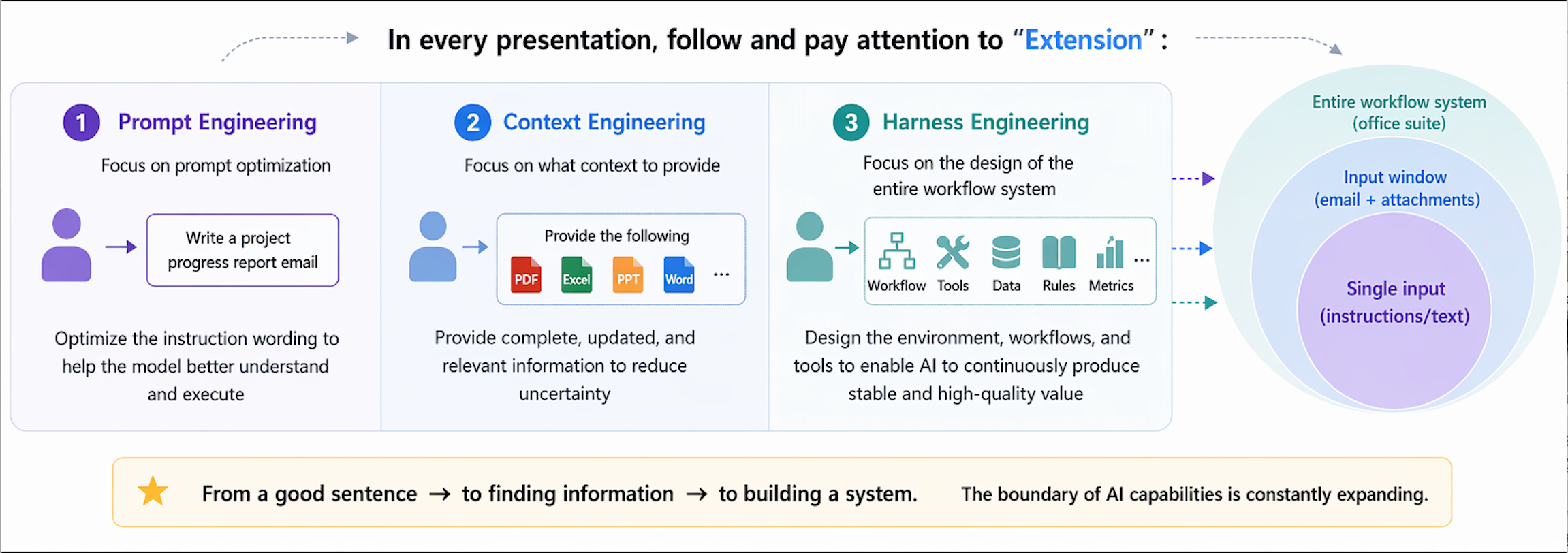
This isn’t a semantic game. Ryan Lopopolo, author of Ghostty, put it perfectly: “Agents aren’t hard. Harnesses are hard.”
Mitchell Hashimoto defined this as the fifth stage of Agent evolution: every time you catch an Agent making a mistake, you engineer a solution so it never makes that mistake again.
In the Ghostty project, every line in the AGENTS.md file corresponds to a mistake the Agent once made. This is the essence of Harness—solidifying lessons learned into systemic constraints.
Part 2: What Is a Harness? A Formula
One-line definition:
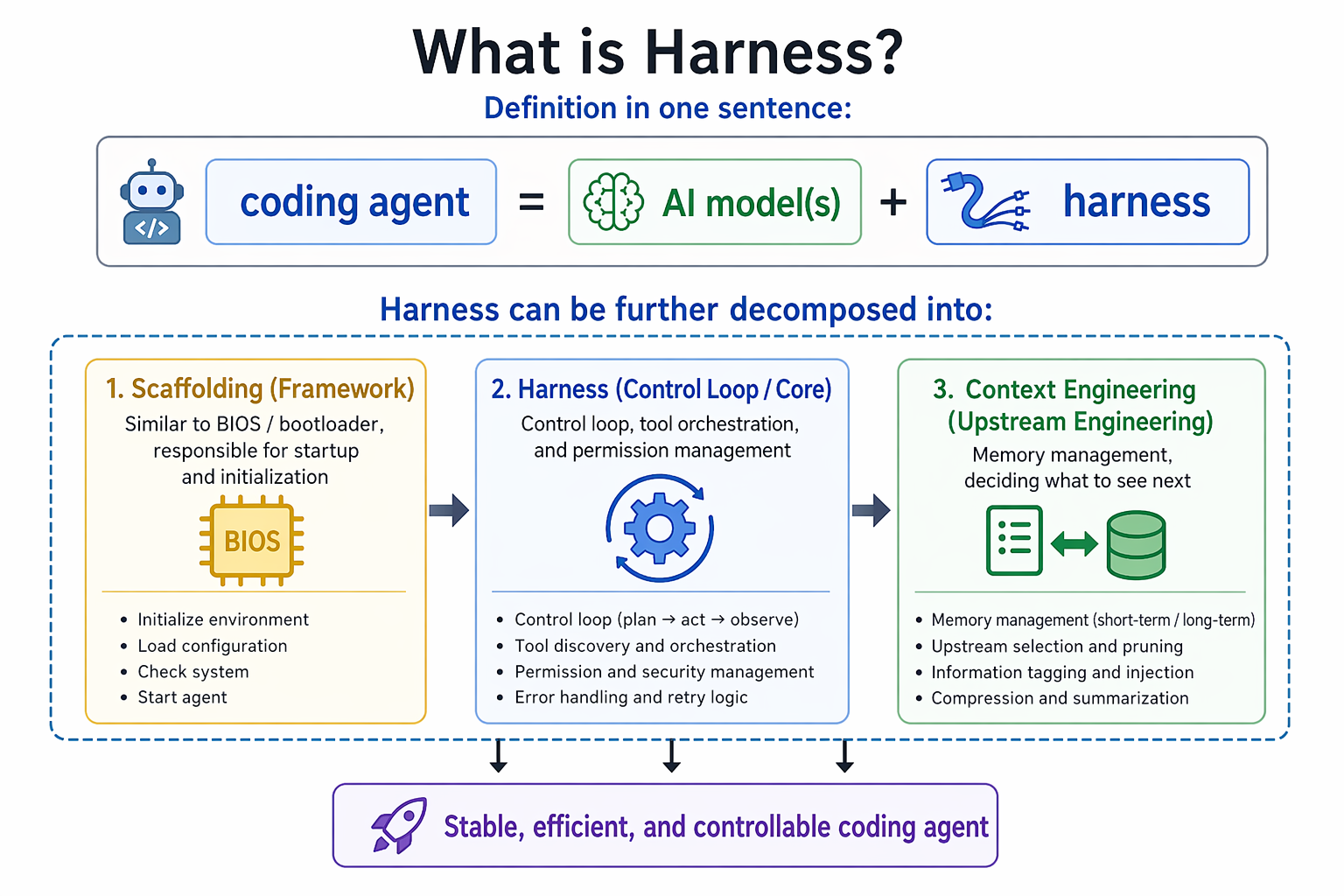
coding agent = AI model(s) + harness
The Harness can be further decomposed:
- Scaffolding — like BIOS/bootloader, handles startup and bootstrapping
- Harness — the control loop, tool scheduling, permission management
- Context Engineering — memory management, deciding what’s visible at each step
The OpenAI Codex team delivered a remarkable report card: 5 months, approximately 1 million lines of code, 1,500 PRs, all generated by Agents, with humans not writing a single line. 3-7 engineers, each merging 3.5 PRs per day, 10x faster than manual coding.
Stripe went even further: merging over 1,300 PRs per week through Blueprint orchestration—a mix of deterministic nodes and agentic nodes.
They didn’t rely on a smarter model. They relied on a more sophisticated Harness.
Part 3: The Three Pillars of a Harness
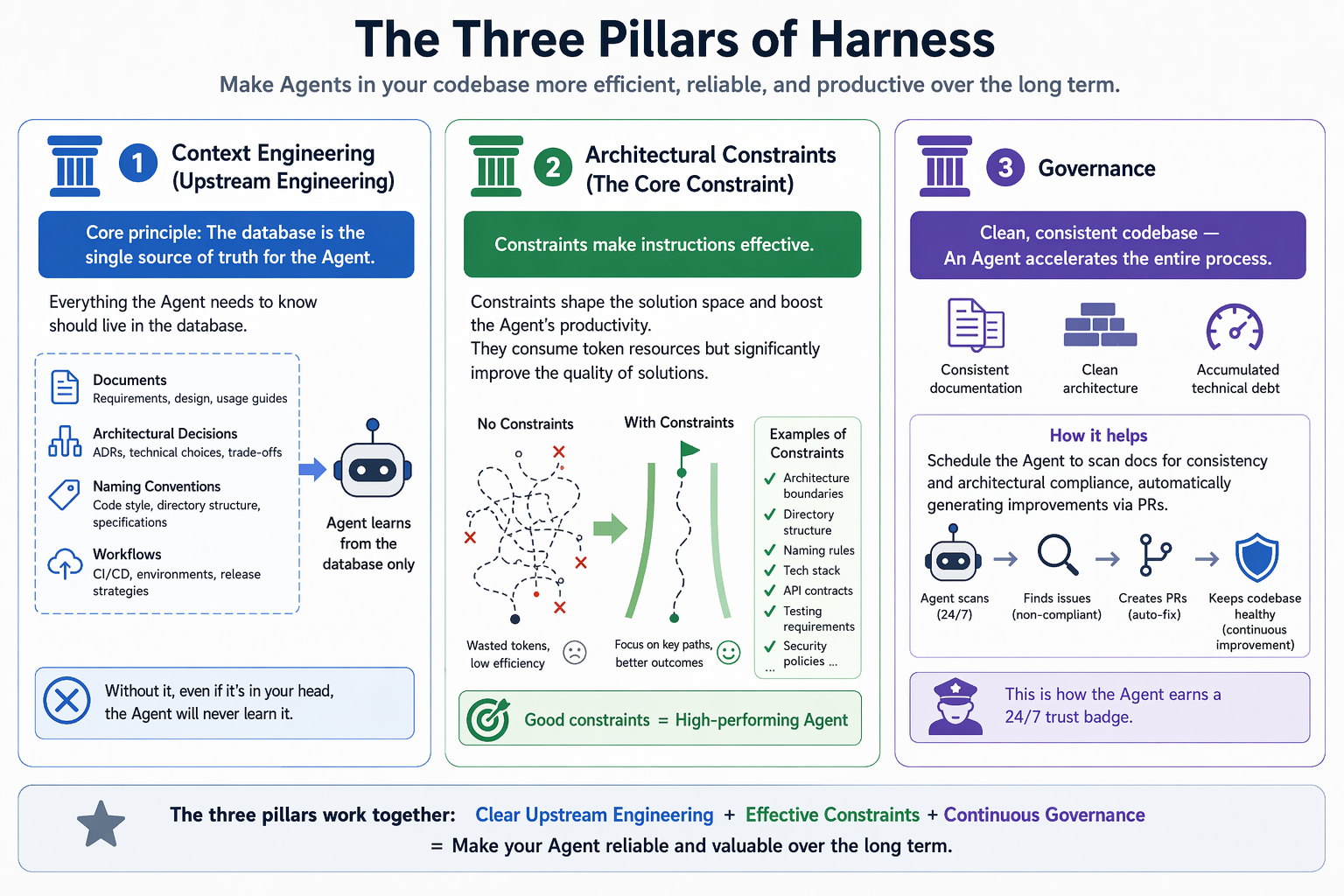
Pillar 1: Context Engineering
Core principle: The repository is the Agent’s only source of knowledge.
This means: everything the Agent needs to know must be written in the repository—documentation, architecture decisions, naming conventions, deployment processes. If it only exists in your head, the Agent will never learn it.
Specific practices:
- AGENTS.md is the single source of truth for behavior. It’s not documentation; it’s the Agent’s “operations manual”
- Code must be legible not just to humans, but to Agents (application legibility)
- ETH Zurich research found that CLAUDE.md / AGENTS.md should be kept to 60 lines or fewer for optimal results
- Give the Agent a browser and observability stack so it can check results itself
Pillar 2: Architectural Constraints (The Core)
This is what distinguishes Harness Engineering from Prompt Engineering: constraints are more effective than instructions.
What does this mean? Instead of saying “please follow the layered architecture” in a prompt, turn the layering rules into machine-checkable hard constraints using linters, type systems, and CI.
Recommended layering pattern:
Types → Config → Repo → Service → Runtime → UI
Each layer can only depend on layers more internal than itself. This rule is enforced by a deterministic linter, not by Agent self-discipline.
Constraining the solution space actually makes the Agent more productive. When an Agent can generate anything, it wastes tokens exploring dead ends. Give it a well-defined track, and it runs faster.
Pillar 3: Entropy Management
Codebases naturally drift toward chaos—inconsistent documentation, architectural erosion, technical debt accumulation. Agents accelerate this process.
The solution: periodically launch Agents to scan for documentation inconsistencies and architectural violations, automatically generating fix PRs. It’s like hiring a 24/7 security guard for your codebase.
Part 4: CLAUDE.md / AGENTS.md Best Practices
What Are They?
| File | Reader | Purpose |
|---|---|---|
README.md |
Humans | Project introduction |
AGENTS.md |
Universal Agent | Project briefing for all AI tools |
CLAUDE.md |
Claude-specific | Claude-specific behavioral instructions |
AGENTS.md is a universal standard introduced in 2025 by Sourcegraph, OpenAI, Google, and Cursor, now maintained by the Agentic AI Foundation under the Linux Foundation. It’s supported by Claude Code, Cursor, Copilot, Gemini CLI, Windsurf, Aider, Zed, Warp, RooCode, and more.
Practical tip: When using multiple tools, unify with symbolic links:
ln -sfn AGENTS.md .github/copilot-instructions.md
Karpathy’s 4+4 Rules
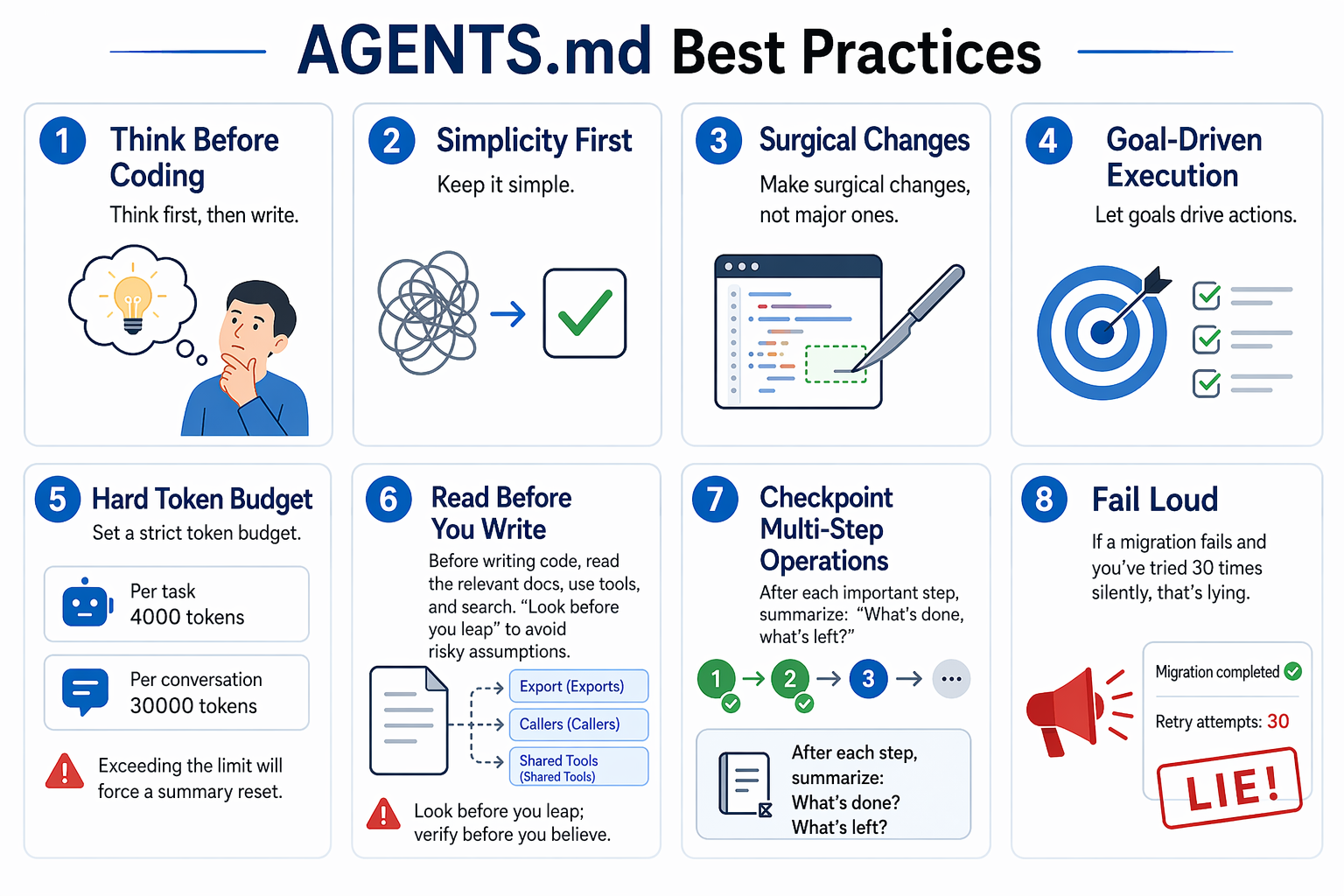
Andrej Karpathy originally proposed 4 CLAUDE.md rules:
- Think Before Coding
- Simplicity First
- Surgical Changes — minimal, targeted modifications
- Goal-Driven Execution
But these 4 rules are no longer sufficient—they’re completely silent on multi-step pipelines. The community later added 4 execution-layer rules:
- Hard Token Budget — set hard token budgets (4,000 tokens per task, 30,000 per session); force summarize-and-restart when breached
- Read Before You Write — before adding code to a file, read its exports, callers, and shared utilities; “looks orthogonal” is a dangerous assumption
- Checkpoint Multi-Step Operations — after each significant step, summarize what was verified and what remains
- Fail Loud — “migration completed” is a lie if 30 records were silently skipped
Why limit to 8 rules? Because past a certain length, Claude stops reading the rules and just pattern-matches the fact that “rules exist.” 8 rules can achieve 75%+ compliance with near-zero error rate.
The Golden Rule for File Length
- 60 lines is optimal, 200 lines is the ceiling
- Claude Code officially recommends keeping it under 300 lines
- CLAUDE.md supports hierarchical loading: Enterprise → Personal → Project → Subdirectory
- Supports
@importsrecursive references (up to 5 levels) - Supports conditional loading:
<important if="language=go">activates only when writing Go
Key Distinction: You Write CLAUDE.md, Claude Writes MEMORY.md
Claude Code has an automatic memory system at ~/.claude/projects/<project>/memory/:
- The
MEMORY.mdindex file is always loaded - Individual memory files are loaded on-demand
- Only the first 200 lines are auto-loaded (
MAX_ENTRYPOINT_LINES=200)
You write CLAUDE.md to tell it the rules; it writes MEMORY.md to remember experiences. Each has its own job.
Part 5: Four Principles for Saving Tokens
An unoptimized Agent running 100 messages per day at 166K input tokens costs about $2,490/month on Claude Opus. Optimized, this drops to $50-100/month.
Where’s the gap? Four design principles:
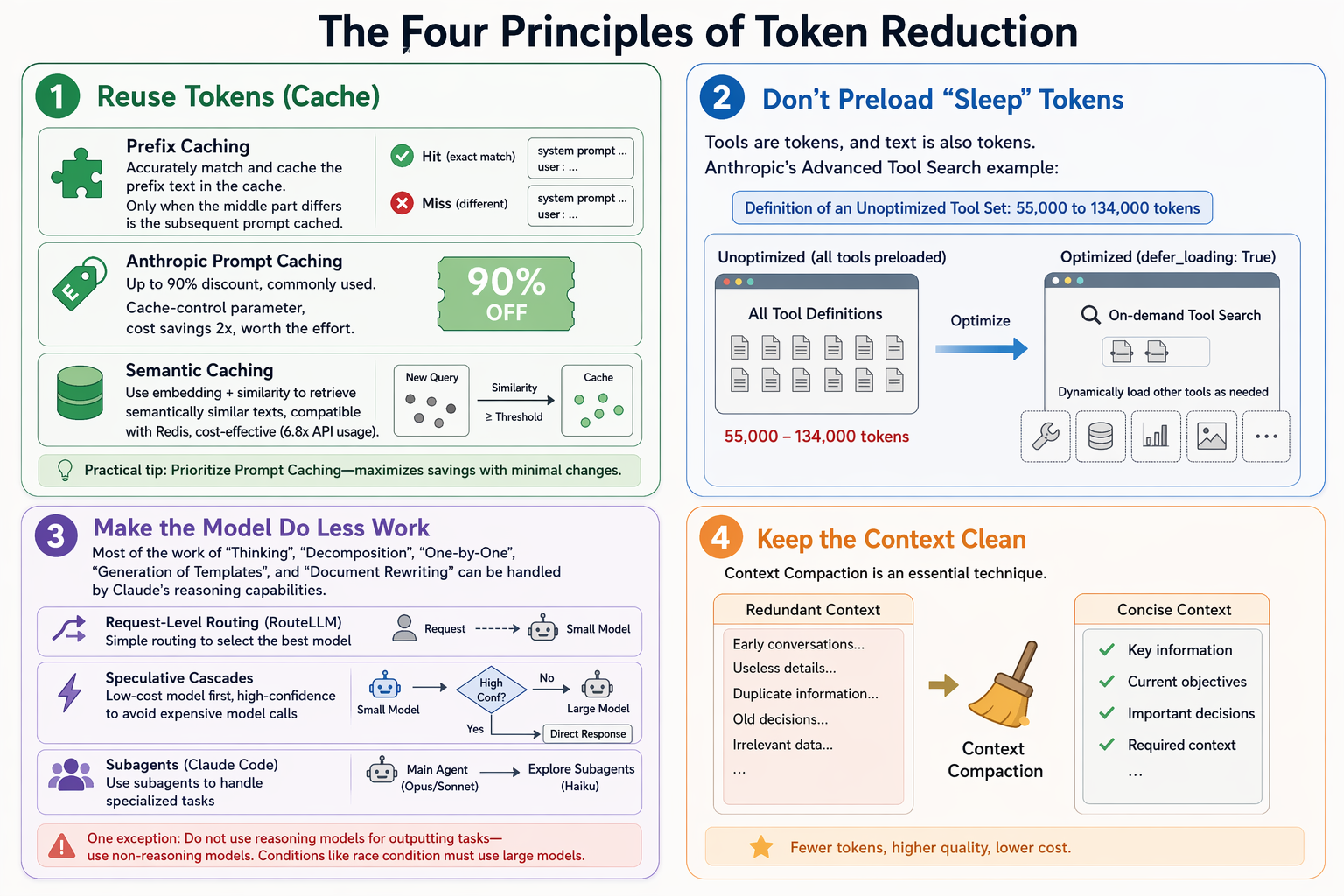
Principle 1: Reuse Tokens (Caching)
- Prefix Caching: Match the prefix exactly to hit cache. Note—even a single space difference invalidates it, so put stable system prompts first
- Anthropic Prompt Caching: Offers 90% discount, requires
cache-controlparameter (storage costs 2x, but still worth it overall) - Semantic Caching: Use embedding + cosine similarity for semantic caching; Redis claims 68.8% API call reduction
Practical advice: Do Prompt Caching first—smallest change, biggest payoff.
Principle 2: Don’t Pre-load “Sleeping” Tokens
Tool definitions themselves consume tokens. Anthropic’s Advanced Tool Search example: unoptimized, there were 55K-134K tokens of tool definitions.
Solution: Use defer_loading: True—initially load only the search tool, dynamically load others when needed.
Principle 3: Cheap Models for Cheap Work
Most tasks aren’t “thinking”—they’re I/O: reading files, generating templates, rewriting docs. Claude’s reasoning power is overkill for these tasks.
Three strategies:
- Request-Level Routing (RouteLLM): Route simple requests to smaller models
- Speculative Cascades: Cheap model generates first, checks confidence, upgrades to expensive model only if needed
- Subagents: Claude Code’s Explore subagent uses Haiku; main context uses Opus/Sonnet
A drone navigation engineer shared an extreme case: using ask-kimi (cheap model for batch reading) + kimi-write (template generation), document update token consumption dropped from ~5,000 to ~200 (25x reduction), costing $0.38/week.
But there’s a bottom line: Don’t delegate reasoning tasks—debugging a race condition requires a large model.
Principle 4: Keep the Context Clean
Context Compaction is a crucial technique. A paper by Jia et al. showed: 6x compression ratio achieves 51.8%-71.3% token budget reduction while improving SWE-bench by 5.0-9.2%.
Cleaning 30-50% of context in a 100K-run, 40K-window scenario saves approximately $6,000.
Part 6: Subagent, Skill, Workflow: Choose the Right Tool
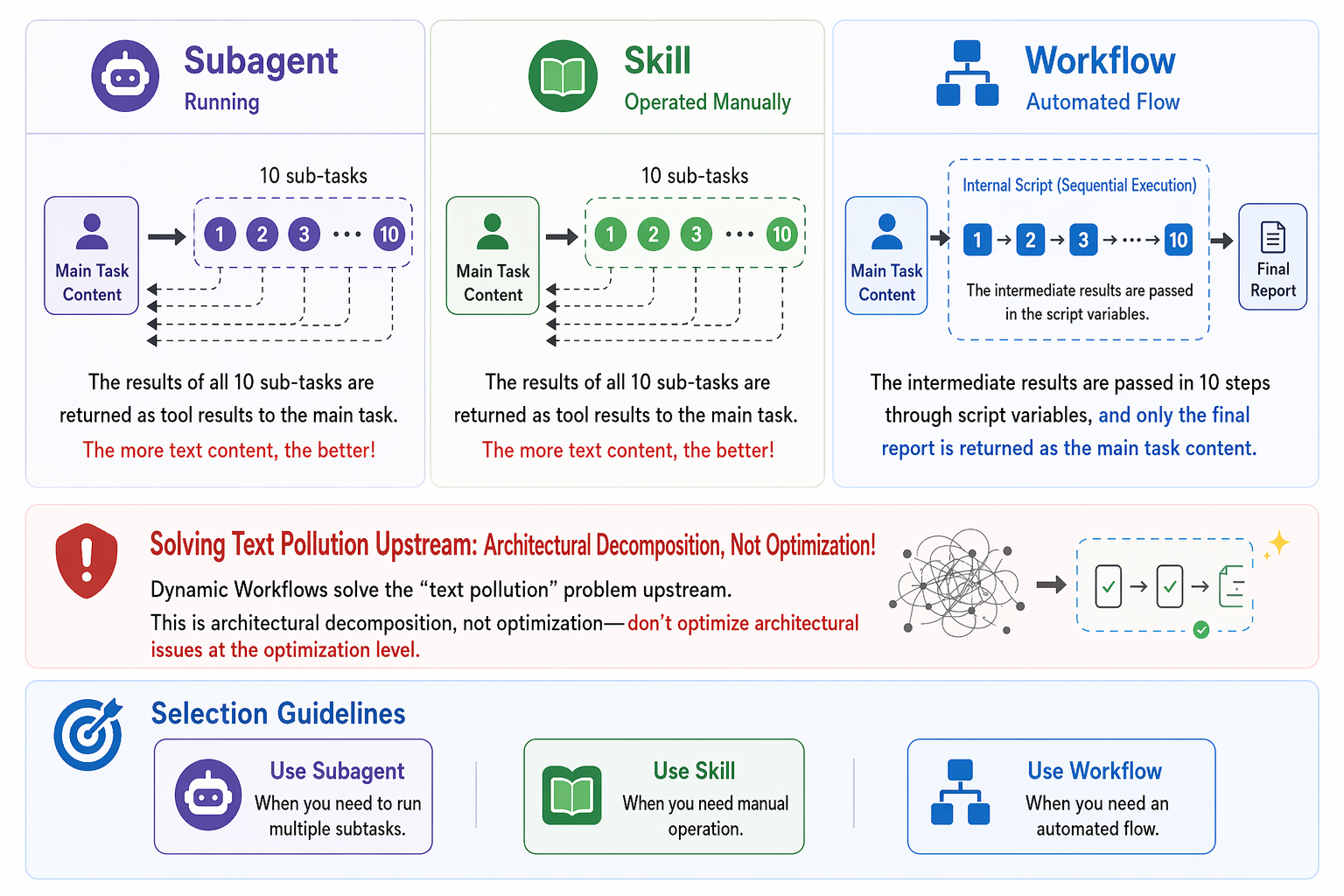
These three are often confused, but their context behavior is fundamentally different:
| Tool | Use Case | Context Behavior |
|---|---|---|
| Subagent | When you need “errands run” | Results of 10 subtasks all return as tool results to the main context, making it increasingly bloated |
| Skill | When you need “to follow a manual” | Same as above |
| Workflow | When you need “pipeline processing” | 10 intermediate results flow through script variables, and only one summary report returns to the main context |
Dynamic Workflows solve the “context pollution” problem. This is architectural decoupling, not optimization—don’t treat an architecture problem as an optimization problem.
Selection rule: Use Subagent for errands, Skill for following manuals, Workflow for pipeline operations.
Claude Code Workflow boundaries (v2.1.154+): up to 16 concurrent agents, up to 1,000 agents per run. Workflow scripts don’t access the file system directly—they orchestrate agents who do the work.
Thariq (Anthropic) summarized six orchestration patterns: classify-execute, fan out-aggregate, adversarial verification, generate-filter, tournament, loop-until-done. The core idea: a harness for every task.
Part 7: Memory Systems: Making Agents Truly Remember
Claude Code’s memory system has a two-layer architecture:
Static Layer (You Write)
The six levels of CLAUDE.md (additive, not overriding):
Managed (enterprise-enforced)
  └─ User (~/.claude/CLAUDE.md, global personal)
      └─ Project (./CLAUDE.md, project-shared)
          └─ Local (./CLAUDE.local.md, personal local)
              └─ Auto (~/.claude/projects/, automatic memory)
                  └─ Team (team-shared)
This layering avoids “wasting tokens loading irrelevant context”—global rules, project rules, and personal rules each serve their purpose.
Dynamic Layer (Claude Writes)
Automatic memory has only 4 types: user, feedback, project, reference.
Memory extraction is triggered by stopHook via an independent extractMemories agent—it perfectly forks the main conversation, reusing the prompt cache (saving money).
Memory retrieval uses Sonnet (not Haiku, not vector search) to pick top-5 from the first 30 lines of frontmatter.
Why not use the cheaper Haiku? Because the cost of misjudging memory relevance is far greater than the extra money spent.
Why not use vector search? Vector search treats retrieval as a “math problem.” Claude Code treats it as a “multiple-choice question.” The latter is more accurate.
When memories are injected, they’re wrapped in <system-reminder> tags with aging warnings: memories from 2 days ago get a stale reminder—“memory says X exists ≠ X currently exists.”
Core discipline: Only record what code can’t derive. Code is “alive”; memory is “dead.”
Part 8: The Five-Layer Self-Repair Harness
Claude Code’s “self-repair” isn’t magic—it’s about making errors visible, verifiable, and written back into the process. A complete Harness has five layers:
| Layer | Components | Purpose |
|---|---|---|
| Entry constraints | CLAUDE.md / .claude/rules |
Define behavior at the source |
| Process protocols | Skills / Commands / Runbooks | Standardize operational procedures |
| Execution checks | Permissions / Hooks / Sandbox | Runtime interception |
| Feedback evidence | Tests / Lint / Typecheck / Logs | Verifiable feedback |
| Long-term records | Auto Memory / Post-mortem rule updates | Knowledge accumulation |
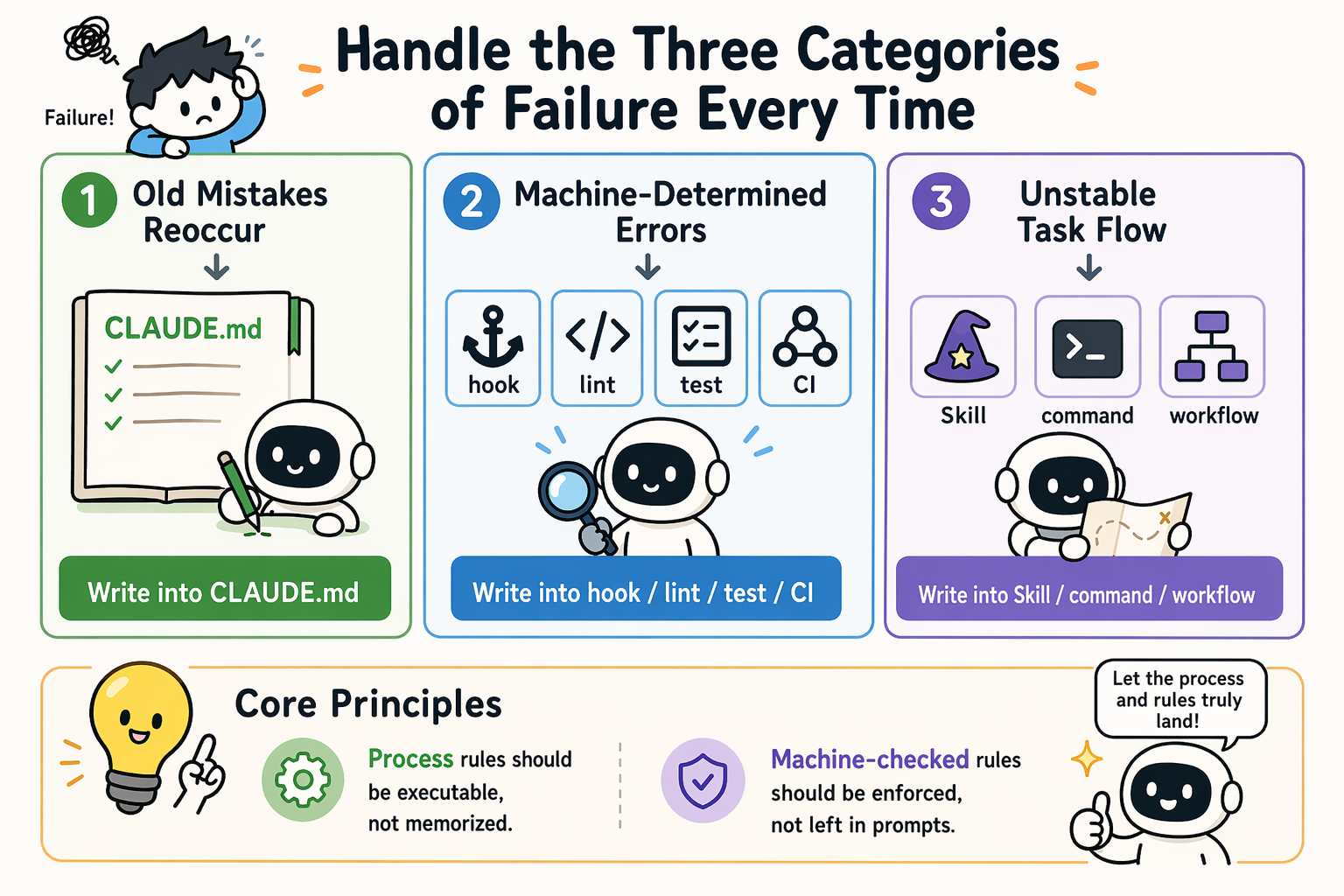
Every failure falls into three categories:
- Recurring old mistakes → Write into CLAUDE.md
- Machine-judgeable errors → Write as hook / lint / test / CI
- Unstable task processes → Write as Skill / command / workflow
Core principle: What can be executed as a process shouldn’t forever live in memory. What can be machine-checked shouldn’t forever live in prompts.
Hooks Don’t Consume Tokens
Hooks run outside the Agent loop—they don’t consume tokens and don’t interrupt tasks. Three key hooks:
- PreToolUse: Intercept dangerous operations (e.g., block
rm -rf) - PostToolUse: Auto-format (run prettier after writing a
.tsfile) - Stop: Completion verification (Claude saying “done” doesn’t mean it’s actually done)
⚠️ Common pitfall: {"matcher": "Write(*.ts)"} is wrong—the matcher matches tool names, not file paths. File types must be checked inside the script. Stop hooks need a stop_hook_active flag to prevent infinite loops.
Part 9: Practical Checklist: Do This
Distilling all the above principles into an actionable checklist:
File Structure
project-root/
├── AGENTS.md          # Single source of truth for Agent behavior (<60 lines)
├── CLAUDE.md          # Just "Read AGENTS.md first" + Claude-specific instructions
├── ARCHITECTURE.md    # Architecture layering rules
├── Makefile           # All commands via make
├── .claude/
│   ├── rules/         # Conditional rules (with paths frontmatter)
│   ├── commands/      # Custom slash commands
│   ├── agents/        # Custom subagents
│   └── skills/        # Reusable skills
├── docs/              # Design docs, security specs
└── exec-plans/
    ├── active/        # In-progress execution plans
    └── completed/     # Completed (for reference)
Daily Operations
- Update CLAUDE.md / AGENTS.md after every correction
- Archive when CLAUDE.md exceeds 280 lines
- Enter Plan Mode for complex tasks; execute only when the plan is solid
- If you do the same operation more than twice a day → make it a slash command
- Use large models for reasoning; delegate I/O to cheap models
- Set per-task and per-session token budgets
- Use PostToolUse hooks to auto-run typecheck
- Use Stop hooks for completion verification
Mindset Shift
| Old Mindset | New Mindset |
|---|---|
| Treat Claude as a chatbot | Treat it as capacity you schedule |
| Fix every mistake yourself | Write every mistake into systemic constraints |
| Write smarter prompts | Build better Harnesses |
| Do everything in one session | Multiple parallel sessions, each with one responsibility |
| Rules in prompts | Constraints in files and CI |
Part 10: Summary in One Sentence
Agents don’t learn and evolve on their own. If you don’t write this knowledge down, the Agent’s 100th mistake will be exactly the same as its first.
Claude Code is a genius junior developer who can write code at incredible speed. But it needs you to guide architecture decisions, security practices, and long-term maintainability.
The senior engineer is still you. Your job isn’t to write more code, but to design the Harness that lets Agents work efficiently, safely, and verifiably.
That’s the whole point of Harness Engineering—going from manually turning the valve yourself, to designing the governor.
This article is compiled from the practical experience of multiple engineers, including Mitchell Hashimoto, Ryan Lopopolo, Boris Cherny (Claude Code creator), Andrej Karpathy, and public shares from the OpenAI Codex and Stripe teams.
← Back to Articles